
Project Proposal Template
A good project proposal answers four questions quickly: what problem are we solving, what will we do, what will it cost and how will we know it worked. This template pack gives you a complete Word proposal structure with guidance in every section, an Excel budget and timeline, and a one-page summary for busy decision-makers.
- Instant download
- Editable Word & Excel
- Print-ready PDF
- 7-day refund
6 files · DOCX, PDF, XLSX
Project Proposal Template Pack
Editable Word project proposal and one-page summary, Excel budget with contingency, Gantt-style timeline, risk register and review checklist.
- Project proposal (DOCX)
- One-page summary (DOCX)
- Budget workbook (XLSX)
- + 3 more
$7.00 USD, one-time 6 files · about $1.17 each
- Instant download
- 7-day refund
- Secure checkout by Stripe
7-day money-back guarantee. Full refund within 7 days of purchase, even after you download.
Free sample: Project Proposal (PDF, 107 KB)
Project Proposal Template Pack
Editable Word project proposal and one-page summary, Excel budget with contingency, Gantt-style timeline, risk register and review checklist.
- Project proposal (DOCX)
- One-page summary (DOCX)
- Budget workbook (XLSX)
- Timeline workbook (XLSX)
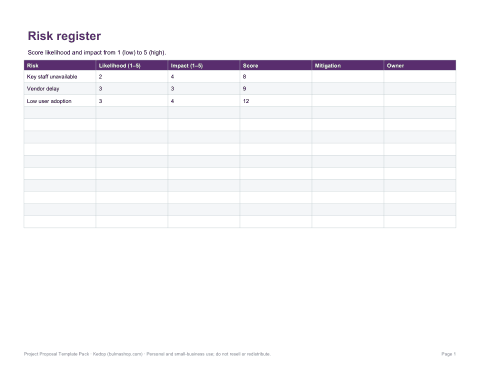
- Risk register (XLSX)
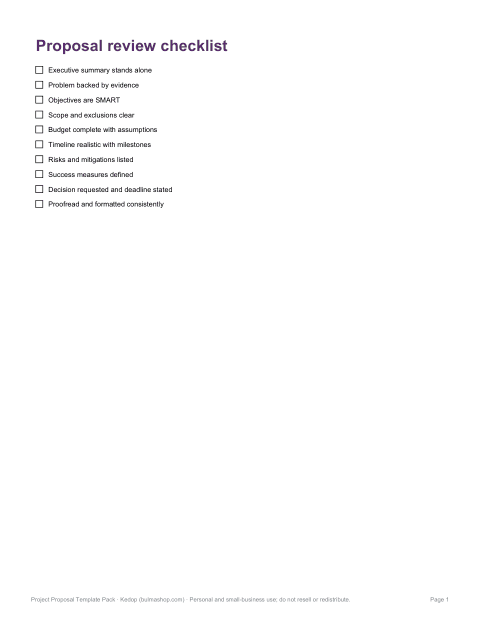
- Review checklist (PDF, DOCX)
Formats: DOCX, PDF, XLSX. Instant download after payment (link valid 72 hours, up to 5 downloads). AI-assisted: the templates were drafted with AI help and reviewed and laid out before publishing.
$7.00 USD, one-time 6 files · about $1.17 each
- Instant download
- 7-day refund
- Secure checkout by Stripe
7-day money-back guarantee. Full refund within 7 days of purchase, even after you download.
Free sample: Project Proposal (PDF, 107 KB)
Full refund within 7 days — see the refund policy and license.
Free printables
Single sheets you can print right now, no sign-up. The full pack adds every sheet in one download plus the editable files.
 Project Proposal Template Printable
 Project Proposal Summary Template
 Project Budget Workbook Template
 Project Timeline Workbook
 Printable Risk Register Worksheet
 Printable Proposal Review Checklist
Sections of a strong project proposal
| Section | What to write |
|---|---|
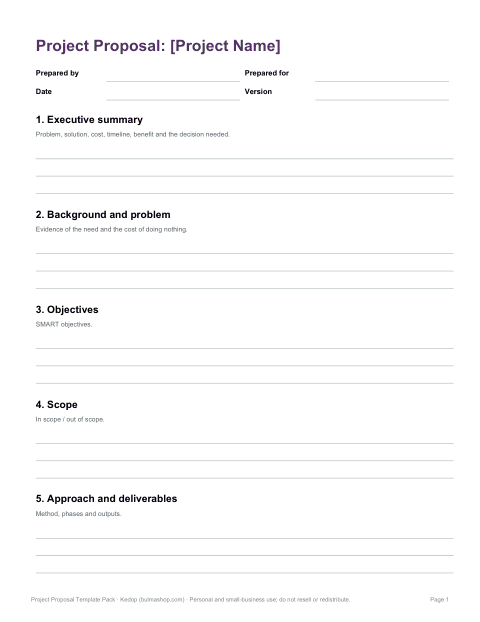
| Executive summary | The problem, your solution, cost, timeline and expected benefit — in half a page |
| Background and problem | Evidence of the need: data, feedback, costs of doing nothing |
| Objectives | Specific, measurable outcomes (SMART) |
| Scope | What is included and, just as important, what is not |
| Approach and deliverables | How the work will be done and what will be produced |
| Timeline | Phases and milestones with dates |
| Budget | Costs by category with assumptions and contingency |
| Team and governance | Who does what and who makes decisions |
| Risks | Main risks, likelihood, impact and mitigation |
| Evaluation | How success will be measured and reported |
| Next steps | The decision you are asking for |
Writing the executive summary
Many readers read only the first page, so the executive summary must stand on its own. Write it last, once the rest is clear. In a few sentences, state the problem and its cost, your proposed solution, the budget and timeline, the main benefits and the decision you need. Use numbers where you can — “reduce order errors from 4% to 1%” is more persuasive than “improve accuracy”.
Setting SMART objectives
| Letter | Means | Example |
|---|---|---|
| S | Specific | Launch an online booking system for all three clinics |
| M | Measurable | Handle 60% of bookings online |
| A | Achievable | Using an off-the-shelf booking platform |
| R | Relevant | Reduces phone load, a top patient complaint |
| T | Time-bound | Within six months of approval |
Building a credible budget
- List costs by category: staff time, contractors, equipment, software, travel, materials and overheads.
- Show unit costs and quantities so reviewers can check the maths.
- State your assumptions — day rates, hours, prices and where they came from.
- Add contingency, often 10–15%, for uncertainty.
- Separate one-off costs from ongoing costs after the project ends.
- For grant proposals, follow the funder’s budget categories and eligibility rules exactly.
Planning the timeline
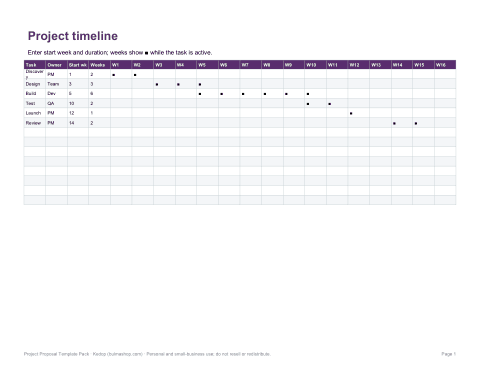
Break the project into phases — discovery, design, build, test, launch, review — and give each a start date, duration and milestone. The Excel timeline shades a bar for each task across weeks so the plan is easy to read, like a simple Gantt chart. Highlight dependencies (tasks that cannot start until another finishes) and decision points where the sponsor needs to approve the next phase.
What is in the template pack
- Project proposal (Word) — all sections with guidance notes to replace.
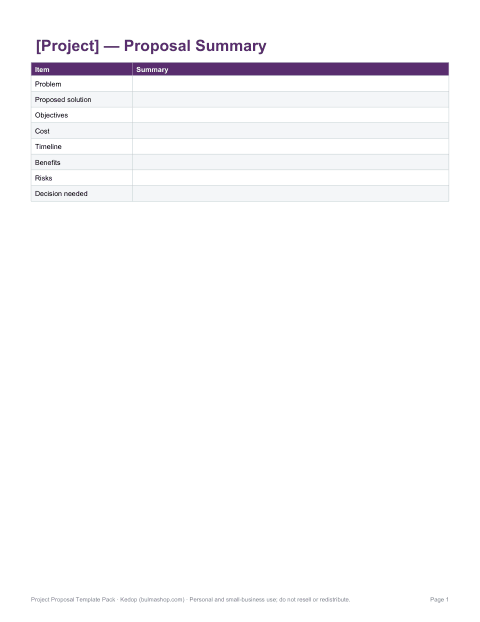
- One-page proposal summary — for executives and quick approvals.
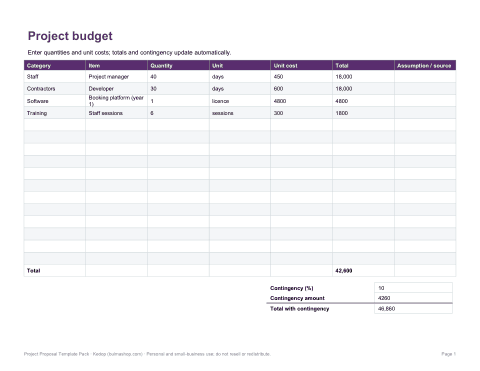
- Budget workbook (Excel) — categories, quantities, unit costs, totals and contingency.
- Timeline workbook (Excel) — Gantt-style weekly bars from start week and duration.
- Risk register — likelihood × impact scoring with mitigations.
- Review checklist — check the proposal before submitting.
Who it is for
Project managers, team leads proposing internal improvements, consultants and agencies pitching work, non-profits writing grant applications, and students writing project proposals for courses.
Formats
Editable Word (DOCX) proposal and summary, Excel (XLSX) budget, timeline and risk register with formulas, and PDF copies for reference.
Tailoring the proposal to the reader
An internal proposal to a finance director should lead with costs, savings and payback; one to an operations manager with workload and process changes; one to a grant funder with outcomes for beneficiaries and alignment with the funder’s goals. Use the reader’s language, answer the questions they are most likely to ask on the first page, and move technical detail to appendices.
Common reasons proposals are rejected
Proposals fail when the problem is not clearly important to the decision-maker, when benefits are vague, when costs look incomplete or unexplained, or when the plan seems unrealistic. Show you understand the organisation’s priorities, quantify the benefit, explain every cost, and name the risks honestly — reviewers trust proposals that acknowledge what could go wrong and how you would handle it.
Frequently asked questions
What should a project proposal include?
Executive summary, problem, objectives, scope, approach, timeline, budget, team, risks, evaluation and next steps.
How long should a project proposal be?
As short as possible while complete — often 2–10 pages, plus a one-page summary.
Does the Excel timeline update automatically?
Yes, bars shade from the start week and duration you enter.
Can I use it for grant applications?
Yes, but follow the funder’s required structure and budget rules.
Was AI used to create the templates?
The templates were drafted with AI assistance and then reviewed, edited and formatted before publishing.